AI Tools for Research
emLab Land and People lab meeting
2026-02-26
Welcome
- AI is transforming the way research is done
- AI is rapidly evolving - tools and capability changing daily (this talk will probably be out of date by next week!)
- Today I’ll focus on tools I’ve personally used, but this is by no means exhaustive
- Since tools are changing so rapidly, we’ll also talk about best practices
- I’m no AI expert - but rather just an enthuastic (and optimistically skeptical) user
- I also really want to hear from you
AI can help with every stage of the research process
- Idea generation
- Literature review
- Data analysis
- Writing and communication
- Collaboration and project management
A bit on different LLM options
- Google’s Gemini
- General purpose, good for lit review, idea generation, etc
- Excellent data privacy protections through UCSB license
- Anthropic’s Claude
- Excellent for coding
- Direct agentic integration with your IDE
- GitHub Copilot
- Designed for coding, integration with your IDE and Github
- Can use many LLM backends (Gemini, Claude, GPT, etc.)
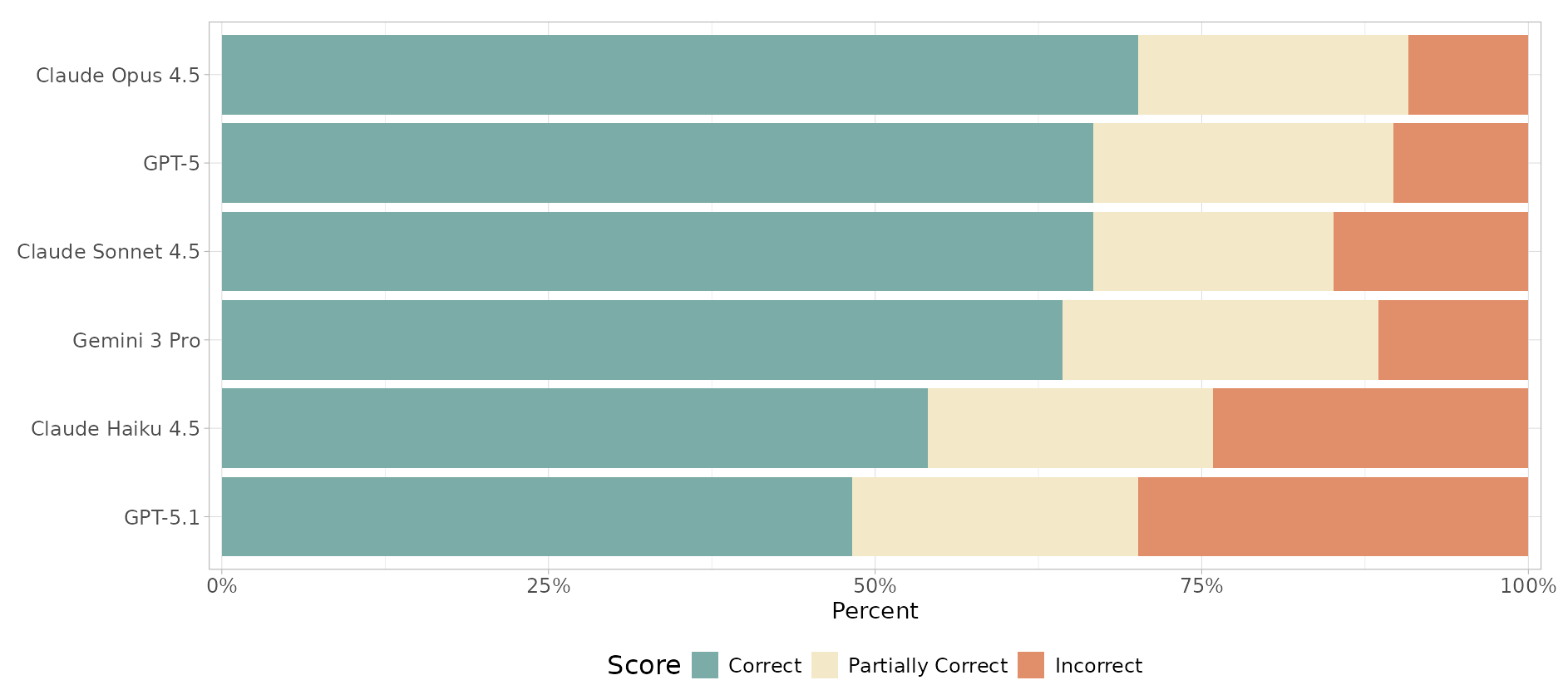
What LLM is best for coding?
Short answer: Claude (for R, at least for now…)
Check out Claude’s Constitution
Keep an eye on Posit’s AI Newsletter and R Benchmark tests
Data privacy
- Always check the data privacy policies of any AI tool you use
- UCSB’s Gemini license has excellent protections
- Approved for P1/P2/P3/P4 sensitive data
- Your data is not used to train models
- Available for faculty and staff
- Claude Code has settings for data retention, whether your code is used to train models, etc
Research process (1/5): Idea Generation
- Gemini, Claude, GPT
- Gemini Deep Research
- Gemini Gems
Research process (2/5): Literature Review
- Gemini Deep Research
- Gemini Gems
- Gemini Notebook LM
- Google Scholar Labs
- Specialized tools: Research Rabbit, Nature Research Assistant, Elicit, Consensus
Research process (3/5): Data analysis
Coding agents: GitHub Copilot, Positron Assistant, Positron Databot, Claude Code, etc
- Integrated directly into your IDE
- Have access to your codebase, file structure
- Can operate in different modes: ask, edit, or agent, depending on your needs and comfort level
- Great for data science workflows (but anything really)
- Often “BYO-key”
- Can use any LLM backend - Claude, Gemini, etc.
- You’re also subject to that backend’s data privacy policies
Positron Databot
- Developed by Posit team (formerly RStudio) for Positron (modern polygot successor to RStudio IDE; VS Code fork)
- Allows you to interact with your data using natural language
- Designed for exploratory data analysis (can do ML too)
- Designed with responsible, human-in-the-loop use in mind (Databot is not a flotation device)
- Uses a WEAR loop: Write code, Execute, Analyze, Regroup
“In my 30-year career writing software professionally, Databot is both the most exciting software I’ve worked on, and also the most dangerous.” –Joe Cheng, Posit CTO
Positron Assistant
- Developed by Posit team for Positron
- General coding assistant for wide range of tasks
- Similar to Claude Caude, but specifically tailored for data science workflows, with specific R and Python tooling
- Can be used for code generation, debugging, documentation, and more
- Has access to your codebase and file structure, so it can provide more context-aware assistance
- BYOK: Can use various LLM backends (Claude, GPT, etc.)
- Can be used in ask, edit, or agent mode
Which LLM backend for Positron Assistant and Databot: Claude or GitHub Copilot with Claude?
- Claude requires a paid account; Copilot has options
- Copilot gives access to Claude models, but also others
- Using Claude directly gives you access to full context window - it is capped when going through Copilot
- Using Claude directly is faster
- Using Claude through Copilot can quickly exhaust your Copliot credits (at least wotj the education account)
Now what about Claude Code?
- Claude Code has a VS Code extenion, which is similar to Positron Assistant: both provide agentic capabilities
- Assistant is tailored for data science with R and Python; Claude Code more towards general software engineering
- Claude Code can be used in VS Code or Positron; Assistant can only be used in Positron (and is tightly integrated)
- Assistant is BYOK; Claude Code only uses Claude models
- Important: Both Positon Assistant and Databot require an API key; so this works with pay-as-you-go Claude, but currently not with Claude Pro monthly subscription (that might change though)
Getting fancy: Customizing your AI coding assistants
- instructions.md: Specify custom “always-on” instructions: coding standards, style guides, etc to use across all scripts (specify the how) (also called claude.md or positron.md)
- prompts.md: Define reusables prompts for tasks you commonly ask your assistant to do (e.g., “write a function that does X”, etc) (specify the what)
- agents.md: Create custom agent personas that can perform specific tasks, such as data cleaning, EDA, or model training (specify the who)
Research process (4/5): Writing and Communication
- Gemini, Claude, GPT
- Specialized tools: Research Rabbit, Nature Research Assistant, Elicit, Consensus
- Gemini Nano Banana for image generation (e.g., flowcharts, technical diagrams, etc)
“Nano Banana Pro is the first image model that can sometimes generate coherent technical diagrams”
- Sara Altman and Simon Couch, Posit (source)
Research process (5/5): Collaboration and Project Management
- GitHub Copilot for project management and collaboration
- Can generate issues, pull requests, documentation, etc
- Can be used to review code and suggest improvements (either reviewing PRs, or even reviewing code before it’s committed!)
- Can help with project organization and workflow
- Can be done either on GitHub website, or directly through Positron or VS Code IDE
- Various other AI-powered tools in Slack, Asana, Zoom, etc
Resources
Examples
- Vincent Arel-Bundock’s Use LLMs to learn about any chapter of my 𝑀𝑜𝑑𝑒𝑙 𝑡𝑜 𝑀𝑒𝑎𝑛𝑖𝑛𝑔 book, or any function in the
marginaleffectspackage for R or Python. (light lift) - Pedro Sant’Anna’s Comprehensive Guide to Multi-Agent Slide Development, Code Review, and Research Automation (heavy lift)
(Thanks, Robert!)
Getting Started
Recommended First Steps:
- Try Gemini for literature summaries
- Become familiar with GitHub Copilot
- Try a coding assistant for your next data science task
- Try making your own custom instructions file or Gem
Best Practices
Remain accountable
Verify AI-generated content - keep a human in the loop
Check sources
Cite usage appropriately
Maintain data privacy (as needed)
Stay critical, skeptical, open-minded, and curious
Thanks!
This presentation created with Quarto, Positron, and GitHub Copilot
Reach out: Gavin McDonald
Discussion
- What AI tools are you currently using in your research?
- What challenges have you faced with AI tools?
- How can we use AI ethically and responsibly for environmental research?
- What are your best practices for using AI?